In my last post (opens in a new tab), I explained why your password is probably sitting on a leaked list somewhere. The single best defense against that is two-factor authentication (2FA): a second check that proves it’s really you, even if someone has your password.
But not all 2FA is equal. Some methods stop almost every attack. Others can be beaten by a convincing phone call. Here’s every common method ranked from worst to best, with what each one protects you from and where it falls short.
First, what “two-factor” means
Security people talk about three kinds of proof:
- Something you know: a password or PIN.
- Something you have: your phone, a security key.
- Something you are: your fingerprint or face.
Two-factor authentication combines two of these. A password plus a code from your phone means an attacker needs both your password and your phone.
The question is how hard each “second factor” is to steal, intercept or trick you into handing over.
The ranking
6. No 2FA at all
Just a password. If it leaks, or you reuse it, or you type it into a fake login page, the attacker is in. Every method below is a big improvement on this one.
5. SMS and voice codes
How it works: The site texts or calls you with a one-time code.
The good: It’s easy, works on any phone and is much better than nothing. It stops the automated credential stuffing attacks that make up a huge share of account takeovers.
The bad:
- SIM swapping. An attacker convinces your mobile carrier to move your number to their SIM card. From then on, your codes go to them. This has been used to drain bank and crypto accounts.
- Phishing. A fake login page can ask for your code, and you’ll type it in as readily as your password. The attacker uses it within seconds.
- Interception. Text messages aren’t encrypted end to end, and weaknesses in SS7 have been used to intercept them. SS7 is the decades-old system phone carriers use to route calls and texts between each other, and it was built to trust anyone on the network, so an attacker with access can redirect your messages.
Verdict: Use it if it’s the only option, but upgrade whenever you can.
4. Email codes and magic links
How it works: The site emails you a code or a one-click login link.
The catch: Your second factor is only as strong as your email account. If an attacker is in your inbox, they get both factors at once. It’s also just as phishable as SMS.
Verdict: Fine for low-value accounts. Make sure your email account itself has strong 2FA.
3. Push notifications (“Is this you? Approve / Deny”)
How it works: You get a prompt in an app like Microsoft Authenticator, Duo or the Google app, and tap Approve.
The good: It’s convenient and can’t be SIM-swapped.
The bad: MFA fatigue. An attacker who has your password triggers login after login, flooding your phone with prompts, sometimes at 2 a.m., until you tap Approve just to make it stop. Some attackers also message the victim pretending to be IT support: “We’re fixing your account, please approve the prompt.” This technique was used in several high-profile corporate breaches.
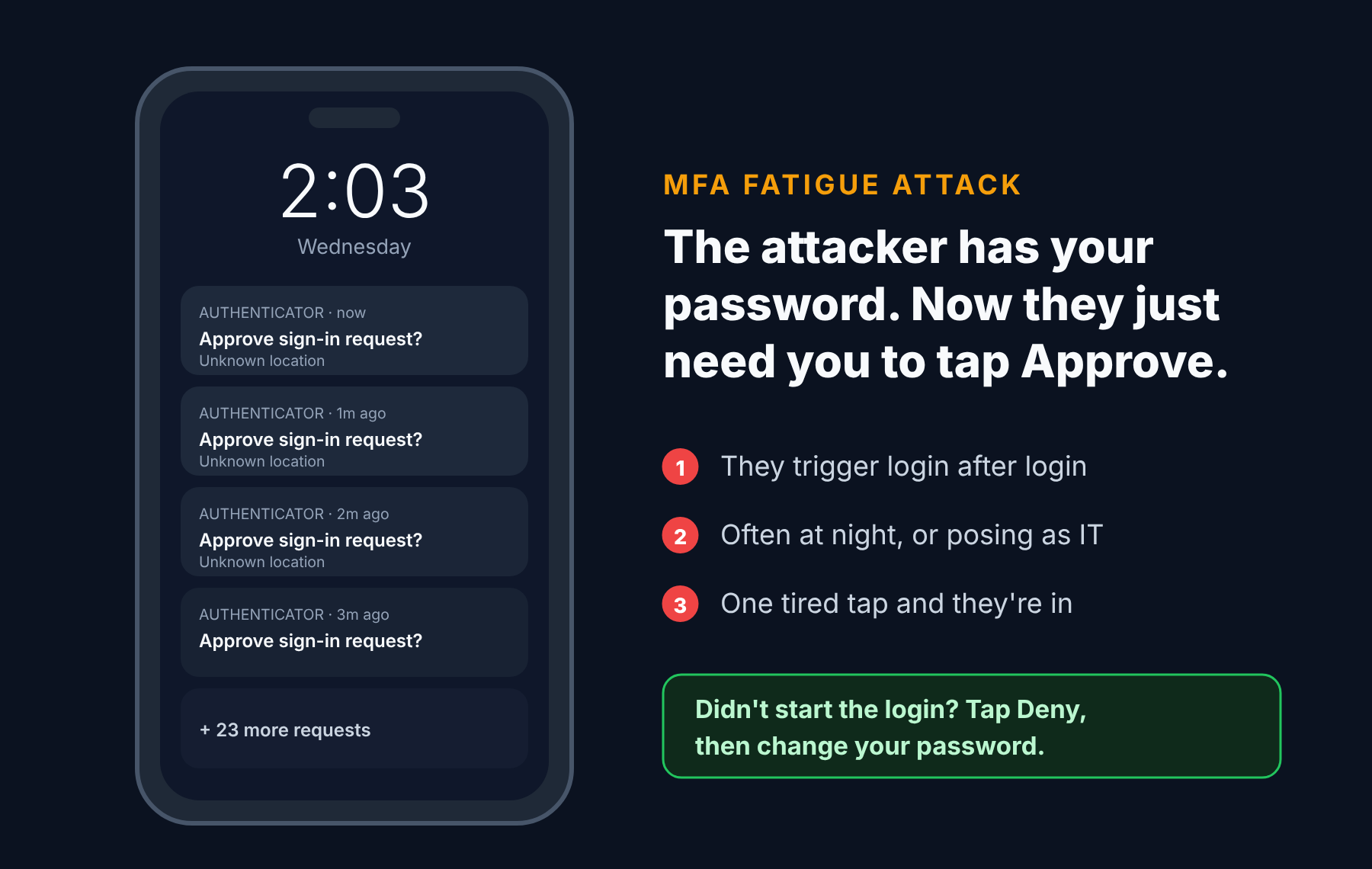
Better versions: Many apps now use number matching, where you have to type a number shown on the login screen into the app. That makes blind approvals much harder. Turn it on if your app supports it.
Verdict: Good, especially with number matching. Never approve a prompt you didn’t start.
2. Authenticator apps (TOTP codes)
How it works: An app such as Google Authenticator, Microsoft Authenticator, Aegis, 2FAS or the one built into your password manager generates a new six-digit code every 30 seconds.
The good:
- The codes are generated on your device, so there’s nothing to intercept over the phone network.
- It can’t be SIM-swapped.
- It works offline.
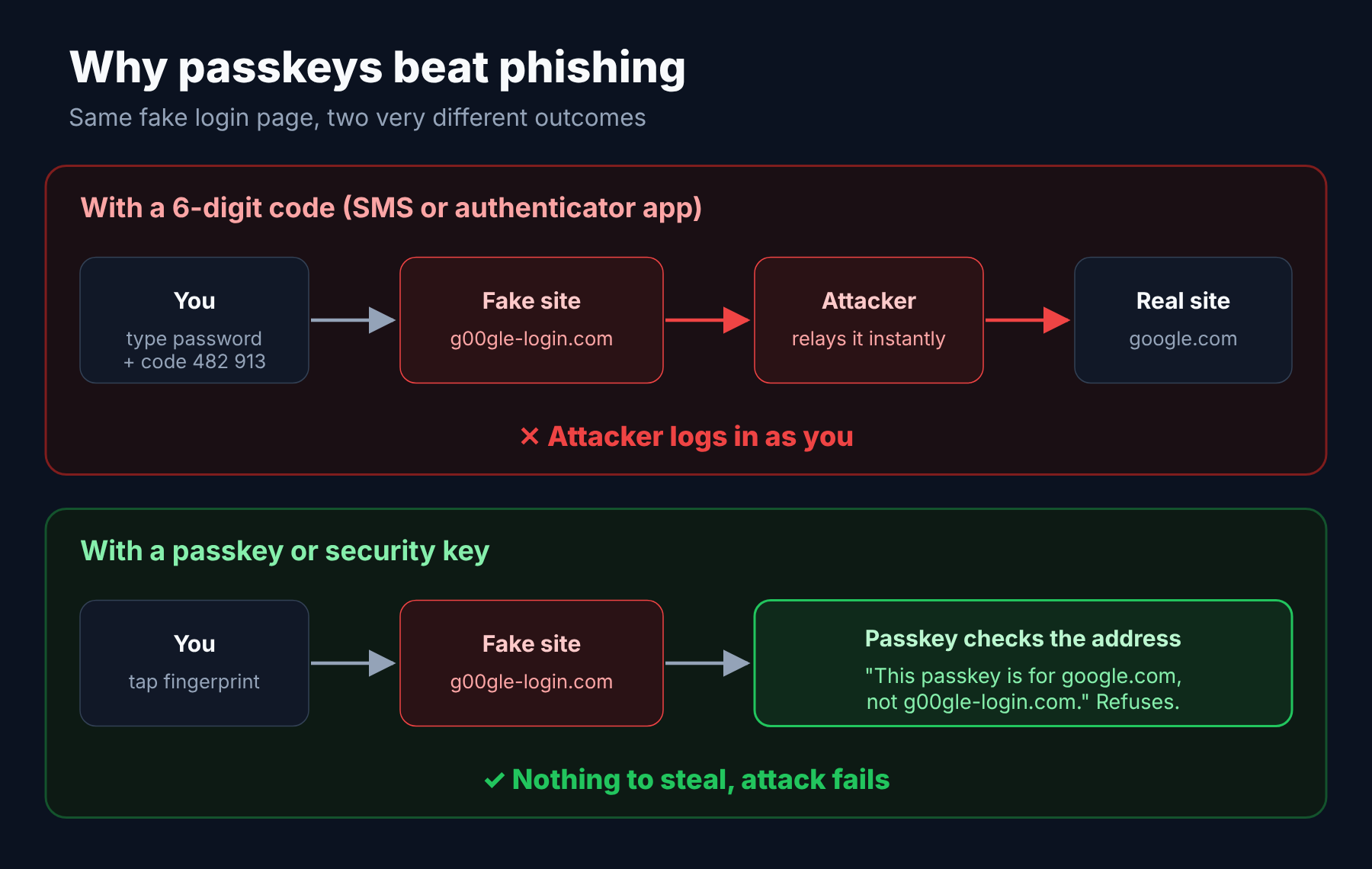
The bad: It’s still phishable. A fake login page can ask for your current code and pass it straight to the real site in real time. Modern phishing kits do this automatically.
Tip: Make sure your codes are backed up (most apps now offer encrypted cloud backup) and save each site’s recovery codes somewhere safe. Losing your phone shouldn’t mean losing your accounts.
Verdict: A solid choice for most people and most accounts.
1. Hardware security keys and passkeys (tied for first)
These two share the top spot because they’re built on the same technology, the FIDO2 / WebAuthn standard, and share the property that matters most: they can’t be phished.
Here’s why. When you log in, your key or passkey checks the website’s real address. A passkey made for google.com simply won’t respond to g00gle-login.com, no matter how convincing the fake page looks. There’s no code for you to type into the wrong place, because there’s no code at all.
Hardware security keys (like YubiKey or Google Titan) are small USB or NFC devices. You plug one in or tap it on your phone to log in.
- Best for: high-value accounts (email, banking, cloud, admin accounts) and anyone who might be targeted.
- Downsides: They cost money (around $25 to $60), and you should buy two so you have a backup.
Passkeys are the same protection built into your phone, computer or password manager, unlocked with your fingerprint, face or device PIN.
- Best for: everyone. They’re free, they sync across your devices, and logging in is faster than typing a password.
- Downsides: Not every site supports them yet, and moving between ecosystems (Apple, Google, Microsoft, password managers) is still improving.
Strictly speaking, a passkey often replaces your password entirely rather than adding a second factor. It combines something you have (your device) with something you are or know (your fingerprint or PIN) in one step.
Verdict: The gold standard. Use passkeys wherever they’re offered, and consider hardware keys for your most important accounts.
The ranking at a glance
| Rank | Method | Stops leaked passwords | Stops SIM swaps | Stops phishing |
|---|---|---|---|---|
| 1 | Passkeys / hardware keys | ✅ | ✅ | ✅ |
| 2 | Authenticator app (TOTP) | ✅ | ✅ | ❌ |
| 3 | Push with number matching | ✅ | ✅ | ⚠️ Partly |
| 4 | Email codes / links | ✅ | ✅ | ❌ |
| 5 | SMS / voice codes | ✅ | ❌ | ❌ |
| 6 | No 2FA | ❌ | ❌ | ❌ |
What should you actually do?
You don’t need to move everything to hardware keys tonight. Start here:
- Secure your email first. It’s the master key to all your other accounts. Set up a passkey or an authenticator app on it today.
- Then your money. Banking, payment apps (PayPal and the like) and any crypto accounts.
- Then everything else that matters to you: social media, cloud storage, shopping accounts with saved cards.
- Remove SMS as a fallback where the site lets you, once you have a stronger method set up. Otherwise attackers will just choose the weakest option.
- Save your recovery codes in your password manager or printed somewhere safe.
The bottom line
Any 2FA is far better than none. But if you remember just one thing from this post, make it this: codes can be phished; passkeys and security keys can’t.
The best method is the strongest one you’ll actually keep using. For most people in 2026, that means passkeys wherever possible and an authenticator app everywhere else.
Which 2FA method do you use? Let me know on LinkedIn (opens in a new tab).