Here’s an uncomfortable fact: if you’ve been online for more than a few years, at least one of your passwords is almost certainly sitting in a file that criminals trade, sell and test every day.
That isn’t paranoia, and it doesn’t mean you did anything wrong. Billions of usernames and passwords have leaked over the past decade, and most of them came from companies that got hacked, not from the people who owned the accounts.
The good news is that you can find out whether you’re affected in about two minutes, and you can fix it in an afternoon.
How your password ends up on a list
Most leaked passwords come from one of three places.
1. Company data breaches. An attacker gets into a company’s systems and copies its user database. If that company stored passwords badly (in plain text, or with weak, outdated hashing), the attacker can recover many of them. Even well-protected passwords can be cracked if they’re short or common.
2. Phishing. You get an email or text that looks like it’s from your bank, a delivery company or Microsoft. You click, you land on a convincing fake login page, and you type your password straight into the attacker’s hands.
3. Infostealer malware. This one is growing fast. Malware hidden in pirated software, fake browser extensions or game “cheats” quietly copies the passwords saved in your browser and sends them to the attacker. One infected laptop can leak every account you’ve ever saved.
Whatever the source, the stolen credentials end up compiled into huge lists, sometimes called “combo lists,” that circulate on criminal forums and Telegram channels.
Why one leak becomes many hacked accounts
Leaked passwords are dangerous mainly because of a habit almost everyone has: reusing passwords.
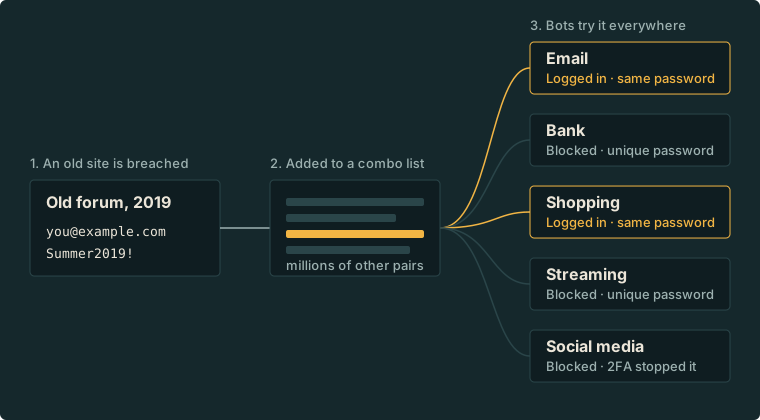
Attackers know this, so they use a technique called credential stuffing. They take a leaked list of email and password pairs and run them automatically against hundreds of other sites: email providers, banks, shopping sites, streaming services, social media.
If you used the same password on a forum that got breached in 2019 and on your email account today, the attacker doesn’t need to hack your email. They just log in.
And once someone is in your email, they can reset the password on almost everything else you own.
Check whether you’ve been exposed
The easiest place to start is Have I Been Pwned, a free service run by security researcher Troy Hunt. It tracks billions of accounts from known breaches.
- Go to haveibeenpwned.com.
- Enter your email address.
- See which breaches it has appeared in, and what data was exposed in each (passwords, phone numbers, addresses and so on).
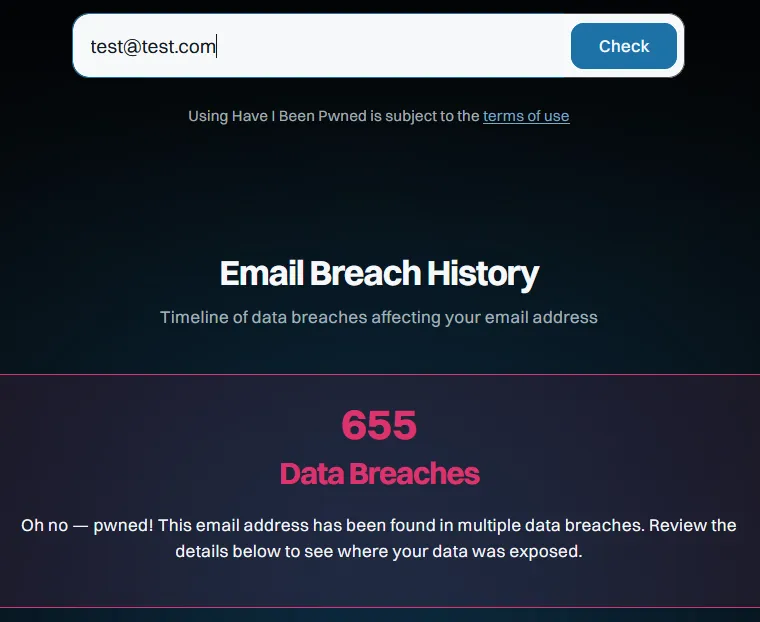
Do this for every email address you use, including old ones.
You can also check passwords directly on the site’s Pwned Passwords page. It uses a clever technique called k-anonymity: your browser sends only the first five characters of a hash of your password, so the full password never leaves your device.
Other places that will warn you automatically:
- Google Password Manager has a Password Checkup in Chrome and Android settings.
- Apple Passwords (iPhone, iPad and Mac) flags compromised passwords under Security Recommendations.
- Password managers like Bitwarden, 1Password and Proton Pass include breach monitoring.
Found yourself in a breach? Do this
Don’t panic. Being listed in a breach is common. What matters is what you do next.
1. Change the password on the breached site. If the account is one you no longer use, delete it.
2. Change that password everywhere else you used it. This is the step that actually protects you from credential stuffing. Start with your email, then banking, then everything else.
3. Turn on two-factor authentication (2FA). Even if an attacker has your password, 2FA stops them at the door. Use an authenticator app or a hardware key rather than SMS where you can.
4. Switch to passkeys where they’re offered. Google, Apple, Microsoft, Amazon and many others now support passkeys, which can’t be phished or leaked in a breach the way passwords can.
5. Watch for follow-up scams. Breached data often includes your name, email and phone number. Expect convincing phishing messages that reference the breach. Be suspicious of anything urgent.
Stop it from happening again
The real fix is to make a single leak harmless.
- Use a password manager. It generates a long, unique password for every site and remembers them for you. You only need to remember one strong master password.
- Never reuse passwords. With a password manager, you never need to.
- Prefer passkeys, then 2FA. Turn on the strongest login option each important account offers.
- Be careful what you install. Avoid pirated software, cracked games and random browser extensions, which are the main way infostealers spread.
- Set up breach alerts. Have I Been Pwned lets you subscribe to notifications for your email address.
The bottom line
You can’t stop companies from getting breached. You can make sure a breach at one company doesn’t hand an attacker the keys to your whole digital life.
Take two minutes today: check your email on Have I Been Pwned, change any reused passwords, and turn on 2FA for your email account. That one afternoon of effort closes the door most attackers rely on.
Have you found your email in a breach? Let me know on LinkedIn what you discovered. In the next post, I’ll rank every two-factor authentication method from worst to best.